
How to hide Smartsheet sidebar
Works on every website · takes about 10 seconds · free
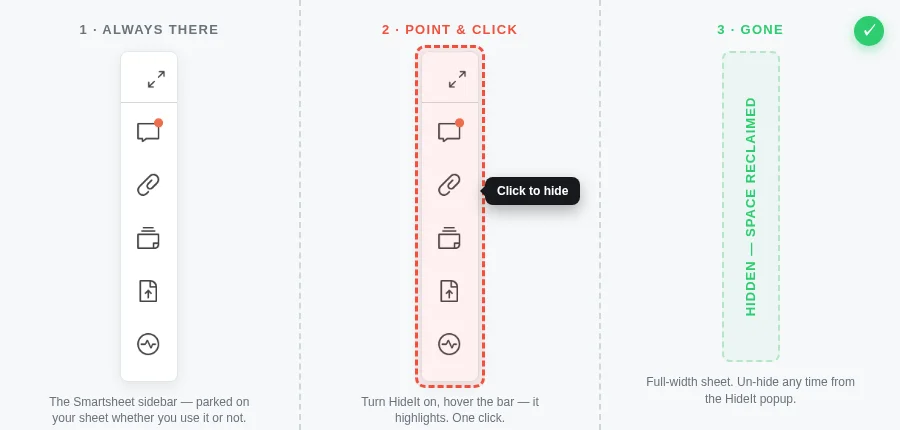
Smartsheet parks a vertical sidebar on every sheet — conversations, attachments, proofs, publish, activity log. Genuinely useful the moment you need it. The other 95% of the time? It just sits there, eating a strip of screen real estate your columns, rows and dashboards could be using. There's no setting to collapse it away for good.
Why it gets in the way
If a panel isn't being used at all, why is it on the page? Every always-on element is one more thing your eyes have to skip past — and research on visual clutter is clear: small distractions compound into real productivity loss. Anything you find annoying or distracting while you work is costing you focus. HideIt flips the default: hide the things you don't need, keep only what moves the work forward, and reclaim the full width of your sheet. When you actually need the sidebar, un-hiding it takes one click in the popup — nothing about your Smartsheet account or data changes; HideIt only hides things from your own view.
The 10-second fix
HideIt is a free browser extension that hides any element you point at — including widgets inside iframes that normally swallow your clicks and open instead of hiding.
- 1. Install HideIt — free for Chrome, Firefox and Safari (register below to get the link at launch).
- 2. Turn it on — click the HideIt icon on the page that's bugging you. Until you do, HideIt can't see the page at all.
- 3. Click the widget — hover Smartsheet sidebar until the red outline wraps it, click, choose Every visit. Gone — and it stays gone, even if the site re-injects it.
The manual way (if you like pain)
You can open DevTools, find the element (the sidebar rail container on the right edge of the sheet), and write a custom CSS rule in an ad-blocker. It works until the site changes its markup — HideIt's self-healing selectors handle that for you, and re-hide the element if the site sneaks it back.
Does hiding it break the site?
No — HideIt only hides what you clicked, nothing else. If you ever want it back, open the HideIt popup and un-hide it in one click, per site, per element.
Get HideIt free + launch alert
HideIt is live on Chrome now — free, no account, no tracking. Add to Chrome — free →
On Firefox or Safari? Register below and we'll email you the moment those land — plus priority support. No spam.